
Get started
Administrate Automator: Deep Dive


Demo: See how Administrate Automator brings powerful automations to training, no IT resources or coding needed.
Administrate allows you to sync instructors across different calendars, making it easy to track availability.
In this demo (originally a LinkedIn Live event), John Peebles, CEO, and JJ demo instructor calendar sync, the feature that turns checking fifteen Outlook calendars into a list already ordered by availability.
Administrate syncs Outlook calendars across all of your instructors, while maintaining your privacy and security requirements. Bookings appear instantly, and Administrate can help you optimize and plan instructor schedules. You can see, at a glance, every instructor conflict in one place, and Administrate offers a one-click suggested replacement who is approved, available and in the right location, with notifications going to both the added and the removed instructor.
27:43 watch · 5,263-word transcript
Auto-generated transcript — may contain errors. Tap a timestamp to jump the video.
Alright. Welcome, everybody, to another LinkedIn live on a Tuesday afternoon because we are, as always well, not as always, as often, broadcasting from our intergalactic headquarters here in Edinburgh, Scotland. And, my name is John Peebles. I'm the CEO here at dministrate. And I'm joined with, JJ who is what is your technical product manager? Product product designer. Product designer. Product. It's not manager. One day maybe. Is there a senior in there? A senior product? Maybe maybe senior. I'll be up to you, John.
Joined by JJ, and, we're we're pretty pumped about today because we've got a couple of intertwined updates to our platform that we've been thinking a lot about, we've been excited about, and are basically here to we're here to show you now. And maybe just to set the scene here, if you go to our website, getadministrate.com, note that is not our company name. We are not Get Administrate. It the idea is you get Administrate by going to getadministrate.com. But if you were to go there, you would see us talking about a bunch of things that we do, mainly for classroom training. Right? Which is we help you plan stuff. We help you template things out. We help you do the scheduling. We save you a lot of time in that process.
And all that is great stuff, and it's stuff that we've done for years. It's stuff that our, customers love, and it can save tons and tons of time, which can then be invested in a whole bunch of different arenas. But that assumes a perfect world. We don't have a perfect world. Live in one like that. No. And what today is all about is really what happens when things go wrong, which they inevitably do. You know, a lot of times people start laughing when we talk about this with the customers, and it's like, yeah. By, you you know, nine zero five AM Monday morning, things have gone wrong. And so what JJ is gonna do is take us through, how we think about this in terms of resolving these challenges, identifying these challenges, and doing so in a way that can scale up to hundreds and thousands of instructors, tens of thousands of students, thousands and thousands of classes that are going on all around the world, which is the environment that our customer base tends to operate in.
So is that, good enough preamble there? I think that is. I think I think the only sort of extra part to add is that this will focus specifically on that sort of instructor, issues that you might arise due conflicting scheduling and all of that. But we did recently have, a LinkedIn live where we That's right. Where we went over a lot more of the wider issues, that you encounter during, training. And we have a you know, we've spoken at length about some of those, the features that help support that. But this will be specifically on instructors, but there is a lot there too as well. That's right. So maybe we'll, kick into our demo system here. And JJ has, warned me that there's, like, two thousand four hundred and thirty two things that could go wrong on this live demo.
So It's live. What could possibly go wrong? But, yeah. Take it away. Great. Okeydoke. So here we are, and this is actually the what I was, referencing, with in our previous LinkedIn live, that we were talking about issues and identifying different issues, with your events. And that focused a lot around our dashboard, and in particular, this, widget that we have here. So using this widget, I'm able to see immediately that the first, event that I have at the top of my list has something going on with instructors. So I will go through that. As you might do when you log in at the start of your day and you see the issues come in, let's go resolve them. So I come over to this event, and I can see that, the issue was there wasn't an instructor on there.
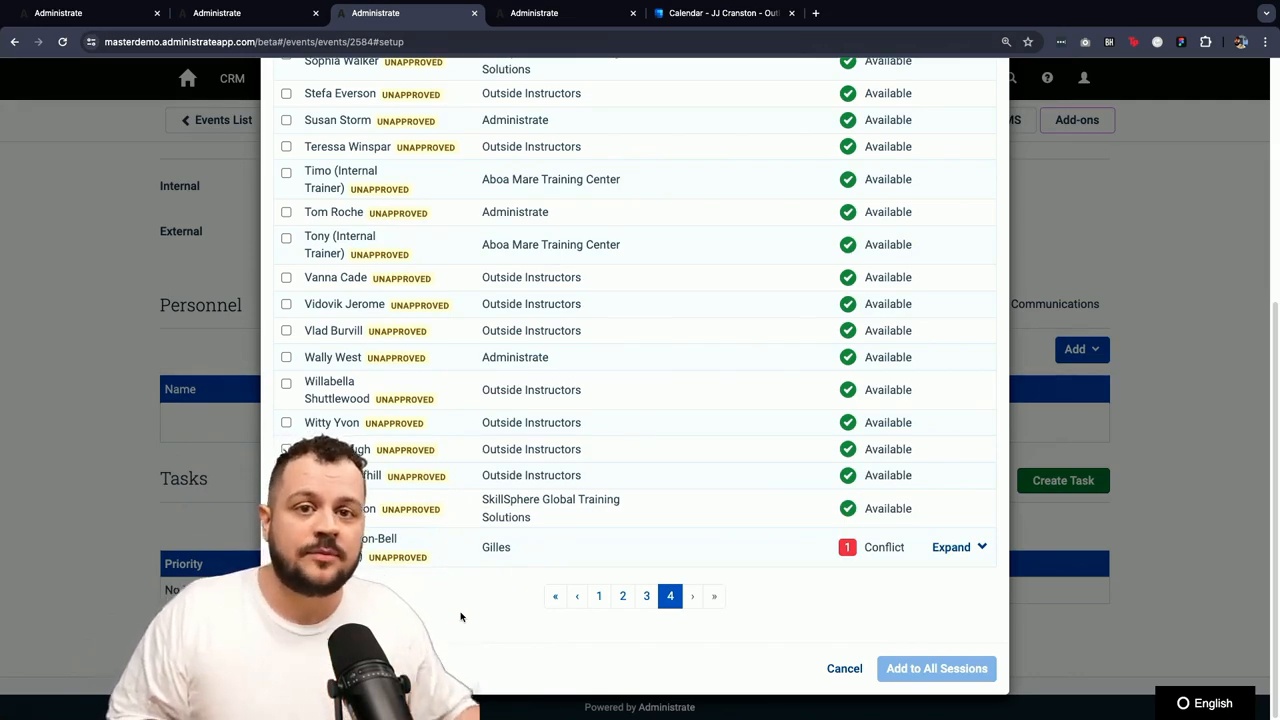
So let's go through the process of adding an instructor on there. And we need to think about a few things when doing this. We wanna think about who is, qualified to be able to take, to teach that that that event. Who is in the the right location, and importantly, who's available. So as we go into add an instructor, what we can immediately see is, this model that will collect together, the available instructors, the instructors that are approved for that training, who can actually deliver it, and that their location matches the location that you're the event that you're delivering it in. Because, again, we focus largely on that sort of classroom, side of things with this, that point in time training.
And so I can see here that I've got three instructors available. And, I know that I could quite comfortably select any one of those, and that would be great for for my booking. But let's just for the argument's sake, let's say that they were all unavailable. What might that look like? And while I might be able to find them if I look for all of my instructors, these are the ones that are not typically ones that would be running, this particular event. But in some cases, the training, you can be a little bit more flexible with that. So we remind you when you come into a view like this that these aren't ones that are approved on your on your course template, which is something that you can and as we go down this list, what we'll see at the very bottom here, is Jill's actually has a conflict. So this model is gonna order, your instructors by how available they are, with the most available people up at the top of your list.
And then as you go further down you'll begin to see people with one conflict, maybe they have two conflicts, and we're able to see exactly what that conflict is. So Jill's is already booked on to a different course, in the system. So we don't wanna pick Jill's because we don't wanna actually make a conflict, but we will pick myself, who if I take off the match instructor location, There I am. That was so close. I thought that was one of the landmines. Oh, did you? No. No. Not at all. You've got it. It's going well. So let's add myself onto here. Now I am available. So great. I'm able to to, you know, take the instruction, for this event. However, I actually know that I'm not available. So if I go to my calendar, I can see that on Wednesday, which is when, if I go up to the dates here, May first ten AM.
If I look at May first ten AM, I actually have a doctor's appointment then. So I don't think I'll be much good, in class, because I need to be elsewhere. But, of course, I didn't know that. Whoops. I didn't know that here because that information wasn't in the system. But we have a feature for that, and that is something that you can do. You can hook up your instructor calendars. You can get your instructors to share their calendars with you in our system, and that will pull all of the the entries that are in their calendar and then use that so that when you're booking that instructor, you can see if they're available or or not. Because otherwise, we if you're doing that, which you just did, otherwise, you're gonna have to go every single time that you pick an instructor.
You have to check their calendar Mhmm. Probably one by one. Right. You're it's gonna be very wasteful. Yep. It's gonna be very cumbersome, time consuming, and maybe they haven't shared their calendar with you Right. Because they work in some, you know, Far East location or something. So that basically what you're saying is we can automate that and bring that information to the system through this this cellular migration. Yeah. That's exactly right. And so when you you as an admin in our system for setting this up, you can come into our sort of calendar setup area, our calendar sync area, And that will pull together all of the instructors in your system, and will give you a clear status of whether or not they already have their calendar connected. And let's, again, just go for me right now, and we send an email.
And that will send an email off to me that will only take a moment or two, which will include a a quick link that I can click on that will then go through a very standard, OAuth secure process for then connecting my, specifically, my Outlook calendar, into the system and attach that to my record in the system. So, you'll also be able to see as you can see here in this sort of last sync column, that there's confirmation that that invite was sent and that they should be able to to see it. And so if maybe if you didn't receive a response from them, you would be able to come back into this list and go, oh, well, we did send them an invite last week, but they haven't responded to it yet. So maybe we need to send them another one or give them a little, nudge to go ahead and do that.
And so as you can see, I've already got that email into my inbox in there. So I'll just hit the sync calendar button, and then we come on to this screen. Now, the first thing to to notice here is that this is obviously very much branded Administrate, because that's our Administrate TMS system, that we're using there. But, of course, if this was your own instance, all of your own logos and branding and everything else would be there. So it would very much seem, like it is, it is coming from you, that this invite is. And before I click onto this connect with Microsoft button, there's a few things, explanations as to what might happen. Because sometimes there could be a little bit of concern sharing your calendar with a company in terms of what sort of data would they then have access to.
And well, as the instructor, the first choice that you can have, or at least know, is that privacy on your calendar is respected. So if I have a private meeting, on my calendar, that will only ever get pulled in as busy. You won't see any details in the system about that. So if the instructors were worried about that, they don't need to be. It's all protected there. You know, more so probably for the internal instructors that you have on deck is probably more something that you would have that sort of setting where you can see what their calendar is. You can see that they're on different things and maybe some of the the private things are still respected, but you can also blank it out completely. You can make it completely private so that you never see any of the information. You just know when they're available and when they're not.
So a couple I think it was a year or so ago when our CFO called me up and said, are you really building Lego Friday afternoon? Because I'd put that in my calendar. Alright. Okay. That wouldn't happen if we had this privacy city. If you had that practice private, you would I would I would really be building Lego, but nobody nobody would know about it. They just think I was, unavailable. Absolutely. Exactly. Good to know. So let's kick that off then. Let's connect, with Microsoft and I select, you know, the Microsoft account that I'm signed in with, to be able to hit that. And there it is. It's done. It's already done. That was before I'd even finished, repeating that sentence, it was there. So if I go back to this page now, I should be able to see that if I go for my name here, I am connected and that tells me that it was connected right this minute.
And everything was from my calendar synced into the system. And I'll be able to see that when I when I go to the the next screen here. Sorry. I was trying to, show the green check mark. Alright. You'd have to duck. There we go. Connected. We we've got so much tech here. We don't know what to do. Great. Great. And so I can verify that, if I go to this availability calendar here, I can see I am I've got this little icon that's next to my name now in the system that says, yep. Your calendar synced. That's great. And I'm able to see here that the open meeting that I didn't have marked as private, which is this very LinkedIn live right now. I can see that in the system. And I can see tomorrow that we all know was the doctor's appointment, but, of course, that was private.
That's just come into the system as busy. And so that is protected and I don't get to see any more information about that. So go on, John. Now one of the one of the questions we get from time to time is that is a great model for instructors that are outsourced. Right? Because they will be working for multiple companies, potentially. They will not wanna share doctor's appointments and Of course. Kid soccer games and things like that. But we often get the feedback from customers that employ all of their instructors that they do want to see that detail. And so that's why you've kinda kind of got both options. Yeah. And, and you can also bound these things by things like working days and holidays that you load in at a company level.
Right. So, you know, it it really just depends on on kinda what what mechanism you use to engage with your instructors. That's right. And so now that we've got that calendar connected, remember, we had on this refresher training, we had added JJ as the instructor who was originally available because we didn't know any better. But now that we have the calendar connected and we could see that there was that busy appointment, This event is now showing again that there's an issue. And if I go down to the table, I can see, oh, well, actually, JJ here has an issue that's come from his calendar, and it's unknown. We don't know what it is because that was the private one. And we can see that he can actually take this event, which is super helpful for you know, because these things change after the fact.
It's like the what we were saying before, as soon as you start your day, someone's moved an appointment somewhere or booked a different meeting in or whatever it might be, and suddenly, the things that you thought were okay are now got issues and there's conflicts that you need to resolve. Yeah. And that that was fast. Right? I'm not I'm gonna use I'm gonna use a term that engineers hate, but it was effectively, you know, real time. Right? That that's one of the biggest dangers that we see in these large training operations is this stuff is happening. People are updating the account. They're making appointments. They're living their lives. They're they're Yep. They've got a lot a lot of instructors even if they're wholly employed by a training or by by the company that they're doing training for, will be subject matter experts, and they will have other kind of day jobs that they are that they are doing.
So the speed of this is really important, and that was with almost instantly. Absolutely. Well and that's the thing. So if I look back at my calendar here, I can see that this event has come in, and the events, if I were added onto that event, that happens immediately. It will show up into into my calendar. This sort of the call gets fired away immediately and it comes onto the calendar, and for the calendar coming back into the system, that's a very regular sync that happens every hour, for any sort of catching updates. But, of course, if you have suspicions or you think, oh, I just wanna make absolutely double sure that everything is there, you can, of course, just force the sync to happen right then and there, for all of your instructors and that's grand. You can then have the confidence to know that you've got the most up to date availability information for your instructors.
And so this prevent this prevents the reverse problem from happening, which is I'm going to go book a doctor's appointment or Right. Kid's soccer game or whatever. If the training team has scheduled me on to an event, it will pop up right away, and I won't have that problem. Or at least I know that I've got a problem. Absolutely. And so then we come to the okay. So how do we resolve this issue? Now there's a couple of ways that you could go about that. I mean, what I could do is I could go in, I could maybe give well, I couldn't give JJ a call, but let's pretend that that's someone else actually. But I could call them, and I would be like, you know, what's going on? Is there something that we could move in this appointment? Can we make some space for it? We could do the usual conversation that we're very used to at this point for sort of trying to manage the availability, and and sort of working at the scheduling times.
I could remove this, instructor. I could remove JJ from this event and select an actually available one that I have in the system. But, of course, I might not have been on this event looking at it. I might have been back on the dashboard or away doing some other task, and I come back, and I didn't really know what had happened. And so this dashboard, again, would show you that there was an issue, and then you would go back to the event and try and do it. But I think there's a better way, and that would be with our new widget that we are very close to releasing. I think this will be, coming to everyone next week. And this one here will show me all of the instructor conflicts collected together. So if we think about these two widgets here, we've got the the top widget that's looking at all of the events in the next thirty days, and it's just highlighting all of the issues.
Or if there are no issues, it's just showing you the next, events in the next thirty days. But then this one specifically, if I dodge a little bit out the way there, you can see that it's highlighting the instructor issues, and you can see my name, JJ, is up there, and you can see that refresher training, that's been highlighted. And so this is pulling those issues together so that you're always in the know about when those things happen because they don't always happen. Because of your action, it could be someone on your team or the instructor on their calendar or someone else booking them. So let's resolve it. Right? Let's go in and try and fix the refresher training conflict that we have. And there's two ways that we could go about that. The first is that we could take administrative suggested replacement. And this is suggesting to me an instructor that is available, can do it in that location, and is approved for that course.
So if those three parameters is all you need for being able to go, yeah, let's put funds on there, they can do it, they're available, they're in the right place, and they're approved for this training, I can immediately just go ahead and hit the replace button. They are replaced on that. You'll have seen that the event that was up in this event widget has now disappeared because it's no longer an issue. We just fixed it right then and there. And if I were to then go to that event, I can then verify that there's no issues anymore on that event. We just fixed it. And I can see that Fonz is now on it and JJ is not anymore, and there's no conflicts there. And so you can see how helpful that is for being able to just go through the issues, go, yeah.
Good. Replace that one. Replace that one. If you're not happy, with the suggested replacement, of course, if I look at, John Jones here, I could just hit that edit button and we see this familiar model that we just saw in the event again that lets me choose any of the ones, by my pick on who is available, who is approved, and who can do it in that location. So I can make my own choice. That's perfectly fine. And I can go in, and I can give funds a lot more work and put put them on there and resolve those issues. Now they're all all fixed, and I've got nothing nothing to worry about. Okay. Okay. So what we just saw was we have a typical day that starts. We've got everything lined up in terms of I have my instructors and my classes scheduled and so forth, but something happens.
Yes. Because your calendar is synced with Administrate, the minute that something happens, whether it's a new appointment that's being made or, you know, something over the weekend or whatever Mhmm. That gets synced back to Administrate. Yep. Then that immediately flags a issue, which then bubbles up to the dashboard Yep. Which anybody can see if they log in with the right permissions. Mhmm. And I think there we covered this, couple weeks ago, but there's ways to kinda say, I just wanna see the ones that I'm managing and so forth. So if you got a big team, you know, there's ways to to to whittle that down. But it identifies you, and then it gives you basically a one click resolution step if possible. Yes. And so in the space of time that, you know, this could have happened within a minute or two Mhmm.
You could have the whole thing resolved and life continues on. And even if you've got ten or twenty of them that you need to deal with at the at the beginning of the day or after your lunch break or whatever, you can just bash down on Absolutely. And take the take the, suggested Well, that's it. I mean, I I know that that was probably quite quick going through all of that, but that's because it is quite quick. Once you have all of that information available to you, then it can be a fairly straightforward operation that you're going through. And like I say, if you're happy with those suggestions, you can just review that list and go, yep. Good. Good. Good. Good. Good. Good. Good. And all of the problems are fixed. And you don't have to then look at that event. Go, okay. Where are that again? Okay. Let's look at the instructor's calendar. I've got, like, like, seven different instructors that could do it, so let's see which one's available to do. And it just takes so much more time.
You can, of course, still do that if you have other criteria or parameters that you want to use, but for this case, you can just go through that list and get it all resolved very quickly. So a couple of things couple of questions we normally get right about now are, okay, what calendars does it work with? Right now, today, it is Outlook That's right. Only. Right? Google coming at some point in the future. Mhmm. So that's question number one. Question number two is, will our security team be okay with this, or how does that work? So very quickly, we are SOC two certified, ISO twenty seven thousand one certified, which is two of the highest forms of security. And because we are using the Microsoft approved authentication workflow, which have that OAuth step that you saw, that means that each account is being individually authorized, the the instructors do it themselves.
You don't have to worry about passwords or sharing or anything like that. And, our feedback has been most I'd all IT departments so far have been been great with this. It works just like it would with any other integration into a Microsoft product, many of which we use, like Zoom and and so forth. That's right. So that's that's another question. I guess, another question that I I tend to hear about from time to time is, you know, this this mechanism of bringing the data in and and having the computer suggest things and so forth, how good is it? And I guess the the question is, this is the reason why we emphasize setting up things into course templates because the computer and the the platform can then know who is approved.
And believe it or not, in implementation, just getting lists of approved instructors for things is actually one of the more challenging aspects because a lot of those times, this stuff has been shoved in a drawer Mhmm. Or put on an Excel spreadsheet or whatnot. And so by getting this out of people's heads and putting it into a system, it, it's it's a very freeing moment Absolutely. If you will. Yeah. Definitely. And I think the other thing that often gets asked at the same sort of time is, okay, well, that's instructors, but what about my meeting rooms? What about my simulators that we spoke about last time when we were looking at that? And that's the very next sort of piece of work that we're looking at with, this this project that we're working on here, and that is being able to have the calendars for what we call in our system resources, but it's the the rooms, the equipment, the things that you need in order to run that event, that obviously they they often have calendars themselves as to when they can be booked out.
And that is something that we're looking to also add into the system, and you can deal with it in the same way that we just saw here with instructors. Find me the most available one. What location is it in? Is there any issues with it? Let's resolve them, and it's all real quick. Yeah. And the way that customers used to deal with this before we've released these changes is, well, you'd have to generate a report. You'd have to be scheduled. You'd have to run-in the morning or so forth, and that was still a huge leg up from spreadsheets. Yeah. But this is, kind of a next generation thing, and it feeds other things that we'll talk about in kind of future sessions. Things around scheduling on mass, automating some of that scheduling task and so forth. So we're really excited this calendar instructor integration is, the the sync between the two systems is really, really powerful, really, really important, and opens the door to a lot of this type of thing that we're Absolutely.
That we've been working and thinking on for quite a long time. Yeah. Great. What have we missed? Anything? Everything went right. It went right. That was a smooth demo, I think. Good. We're getting good at this. Good. Okay. So, we blitz through that, but if you're out there and you're kinda like, I've got a million and one questions, that's fine. Connect with us on LinkedIn. JJ famously is not on LinkedIn, but that's okay. You can connect with myself or anybody else, within the organization. Send us an email, you know, get in touch with us by phone, whatever it is that you, you know, whatever whatever mechanism you wanna use. Oh, that is one sorry. Before we before we sign up, that is one other question that I that I wanted to ask, which is when you make that change, what happens? How do people get told?
Or as we say in Scotland, telt. How do people get tell? How do you get tell? So what will happen is that one, the, change you will be able to see on the event and in the audit for the event, you'll be able to see that that change has happened. Two, you can have, an automatic trigger, a communication trigger that we again spoke about on a previous live about that system of being able to send out automated communications to to various people that that that you choose. You can send out a communication to when, the instructor is added onto the event, so they can receive also not only will it appear in their calendar, but they'll also get the email through that goes, hey. You've got another course. Here's the material that you need. Here's where you need to go, whatever you do for for setting that up. And then there'll also be, a notification email that will get sent to the instructor that has been removed, just to let them know you've been removed.
It will already by the way, if they had their calendar synced, it will already have been disappeared from their calendar, but they will also then just get that quick notification email that'll come through and go, yep. You're gone off that. Just confirmation. And so that'll save at least a couple of manual emails, maybe in a phone call or two, and the more people trust the system Yep. The more they'll use the system and the the better everything gets. Gets. Absolutely. Okay. So now we're wrapping up. Now we're done. And, you know, we do these almost every Tuesday. We are not gonna be doing a live event next Tuesday for some logistical travel reasons, but we will be back in action in two weeks' time. We don't we're we're we've got maybe, we teased this, previously, but we're we're hoping to get a customer of ours come on, talk through a bunch of these various things that we've been talking about and and some other cool stuff.
So, check out you know, follow us on LinkedIn, and, stay stay tuned for updates and get in get in touch if you wanna hear more or get, an in-depth demo and, because it's a big platform, and we'd love to show it to you. So, Administrate, you know, we're here to, you know, satisfy and help you manage the challenge of classroom training, particularly at scale. Multinational customers use this all over the world, and, we will be back in action in two weeks' time. Absolutely. Thanks, everybody. Thanks, folks.


Get started
